设置标签
¥Setting up tags
Material for MkDocs 新增了使用标签对页面进行分类的高级支持,这使得您可以对相关页面进行分组,并通过搜索和专用的标签索引轻松找到它们。如果您的文档很大,标签可以帮助您更快地找到相关信息。
¥Material for MkDocs adds first-class support for categorizing pages with tags, which adds the possibility to group related pages and make them discoverable via search and a dedicated tags index. If your documentation is large, tags can help to discover relevant information faster.
配置
¥Configuration
内置标签插件
¥Built-in tags plugin
8.2.0
内置的标签插件添加了将任何带有标签的页面分类为页面头条的功能。为了添加对标签的支持,请在mkdocs.yml中添加以下几行:
¥The built-in tags plugin adds the ability to categorize any page with tags as part of the front matter of the page. In order to add support for tags, add the following lines to mkdocs.yml:
有关所有设置的列表,请参阅插件文档。
¥For a list of all settings, please consult the plugin documentation.
高级设置
¥Advanced settings
insiders-4.48.0
以下高级设置目前仅供我们的赞助商使用。这些设置完全是可选的,并且仅为标签插件添加额外的功能:
¥The following advanced settings are currently reserved to our sponsors. They are entirely optional, and only add additional capabilities to the tags plugin:
我们将在不久的将来在这里添加更多设置。
¥We'll add more settings here in the near future.
标签图标和标识符
¥Tag icons and identifiers
8.5.0 。拉链
每个标签都可以与一个图标关联,该图标会在标签内渲染。在将图标分配给标签之前,请先将以下内容添加到mkdocs.yml中,为每个标签关联一个唯一标识符:
¥Each tag can be associated with an icon, which is then rendered inside the tag. Before assigning icons to tags, associate each tag with a unique identifier, by adding the following to mkdocs.yml:
标识符只能包含字母数字字符、短划线和下划线。例如,如果您有一个标签
Compatibility,则可以将compat设置为标识符:extra: tags: Compatibility: compatextra: tags: Compatibility: compatextra: tags: Compatibility: compatextra: tags:兼容性: compat标识符可以在标签之间重复使用。未明确关联的标签将使用默认标签图标,即
接下来,通过在theme.icon配置设置下向mkdocs.yml添加以下几行,可以将每个标识符与一个图标(甚至是自定义图标)关联:
¥The identifier can only include alphanumeric characters, as well as dashes and underscores. For example, if you have a tag Compatibility, you can set compat as an identifier:
输入几个关键字,使用我们的图标搜索找到完美的图标,然后单击短代码将其复制到剪贴板:
Expand to inspect example
用法
¥Usage
添加标签
¥Adding tags
8.2.0 .zip
¥Identifiers can be reused between tags. Tags which are not explicitly associated will use the default tag icon which is
启用内置标签插件后,可以使用前置tags属性为文档添加标签。在 Markdown 文件的顶部添加以下几行:
¥Next, each identifier can be associated with an icon, even a custom icon, by adding the following lines to mkdocs.yml under the theme.icon configuration setting:
该页面现在将在主标题上方和搜索预览中呈现这些标签,现在允许通过标签查找页面。
¥Enter a few keywords to find the perfect icon using our icon search and click on the shortcode to copy it to your clipboard:
How to set tags for an entire folder?
借助内置元插件,您可以确保为整个部分和所有嵌套页面设置标签,方法是在相应文件夹中创建具有以下内容的.meta.yml文件:
.meta.yml中设置的标签会与页面定义的标签合并并去重,这意味着您可以在.meta.yml中定义常用标签,然后为每个页面添加特定标签。.meta.yml 中的标签会被附加到.meta.yml中。
添加标签索引
¥Adding a tags index
8.2.0 .zip
内置的标签插件允许定义一个文件来渲染标签索引,该文件可以是nav部分中的任何页面。要添加标签索引,请创建一个页面,例如tags.md :
¥When the built-in tags plugin is enabled, tags can be added for a document with the front matter tags property. Add the following lines at the top of a Markdown file:
tags 标记指定了标签索引的位置,也就是说,在页面渲染时,它会被替换为实际的标签索引。您可以在标记前后添加任意内容:
¥The page will now render with those tags above the main headline and within the search preview, which now allows to find pages by tags.
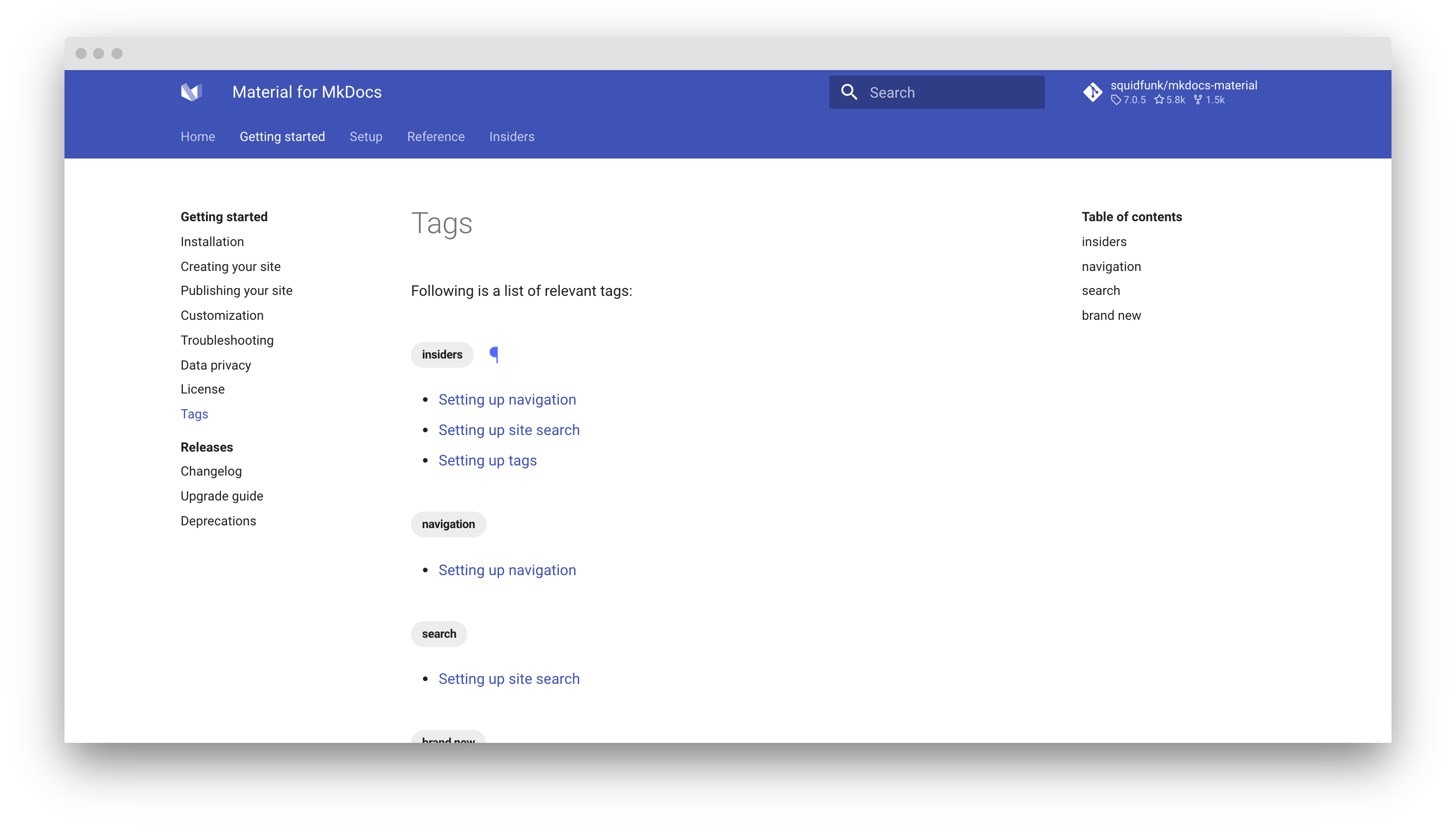
高级功能
¥Advanced features
Insiders发布了全新改版的标签插件,其功能远超社区版的当前版本。它支持任意数量的标签索引(列表)、作用域列表、影子标签、嵌套标签等等。
¥The tags set in .meta.yml are merged and deduplicated with the tags defined for a page, which means you can define common tags in .meta.yml and then add specific tags for each page. The tags in .meta.yml are appended.
可配置列表
¥Configurable listings
9.6.0
您可以在mkdocs.yml中配置列表,也可以直接在 Markdown 文档中标记的位置配置。以下是一些示例:
¥The built-in tags plugin allows to define a file to render a tags index, which can be any page that is part of the nav section. To add a tags index, create a page, e.g. tags.md:
使用范围列表:将标签索引限制为与页面所在文档子部分处于同一级别的页面:
<!-- material/tags { scope: true } --><!-- material/tags { scope: true } --><!-- material/tags { scope: true } --><!-- 材料/标签 { 范围: true } -->仅列出特定标签:将标签索引限制为单个或多个选定的标签,例如
Foo和Bar,排除所有其他标签:<!-- material/tags { include: [Foo, Bar] } --><!-- material/tags { include: [Foo, Bar] } --><!-- material/tags { include: [Foo, Bar] } --><!-- 材料/标签 { 包括:[Foo,Bar] } -->排除带有特定标签的页面:不包含带有特定标签(例如
Internal的页面。标签可以是任何标签,包括影子标签:<!-- material/tags { exclude: [Internal] } --><!-- material/tags { exclude: [Internal] } --><!-- material/tags { exclude: [Internal] } --><!-- 材料/标签 { 排除:[内部] } -->启用或禁用目录中的标签:指定目录是否列出最近的标题下的所有标签:
<!-- material/tags { toc: false } --><!-- material/tags { toc: false } --><!-- material/tags { toc: false } --><!-- 材料/标签 { toc: false } -->
查看所有选项的列表配置。
¥The tags marker specifies the position of the tags index, i.e. it is replaced with the actual tags index when the page is rendered. You can include arbitrary content before and after the marker:
范围列表
¥Scoped listings
insiders-4.48.0
如果您的文档很大,您可能需要考虑使用范围列表,该列表仅包含与列表页面同级或更低级别的页面。只需使用:
¥Insiders ships a ground up rewrite of the tags plugin which is infinitely more powerful than the current version in the community edition. It allows for an arbitrary number of tags indexes (listings), scoped listings, shadow tags, nested tags, and much more.
如果您计划使用多个范围索引,最好在mkdocs.yml中定义一个列表配置,然后可以通过其 id 引用它:
您现在可以使用:
¥Listings can be configured in mkdocs.yml or directly at the location of the marker that you position in a Markdown document. Some examples:
影子标签
¥Shadow tags
insiders-4.48.0
¥Use scoped listings: limit the tags index to pages that are on the same level of the subsection of the documentation the page is in:
阴影标签是专门用于组织的标签,只需一个简单的标志即可在渲染时包含或排除它们。它们可以在shadow_tags设置中枚举:
¥List only specific tags: limit the tags index to a single or multiple selected tags, e.g., Foo and Bar, excluding all other tags:
如果文档带有Draft标签,则仅当启用阴影设置时才会渲染该标签,禁用阴影设置时则会排除该标签。这是一个使用标签进行结构化的绝佳机会。
¥Exclude pages with specific tags: don't include pages that are tagged with specific tags, e.g. Internal. This can be any tag, including a shadow tag:
嵌套标签
¥Nested tags
insiders-4.48.0
¥Enable or disable tags inside the table of contents: specify whether the table of contents lists all tags under the nearest headline:
Insiders版本新增了对嵌套标签的支持。tags_hierarchy_separator 允许创建标签的层级结构,例如Foo/Bar 。嵌套标签将渲染为父标签的子标签:
¥See the listing configuration for all options.
隐藏页面上的标签
¥Hiding tags on a page
虽然标签显示在主标题上方,但有时可能需要在特定页面上隐藏它们,这可以通过 front matter hide属性来实现: