设置站点分析
¥Setting up site analytics
与网络上提供的任何其他服务一样,了解项目文档的实际使用方式是成功的关键因素。Material for MkDocs 与Google Analytics原生集成,并提供可自定义的Cookie 同意和反馈小部件。
¥As with any other service offered on the web, understanding how your project documentation is actually used can be an essential success factor. Material for MkDocs natively integrates with Google Analytics and offers a customizable cookie consent and a feedback widget.
配置
¥Configuration
谷歌分析
¥Google Analytics
7.1.8
Material for MkDocs 与 Google Analytics 4 1原生集成。如果您已经设置了 Google Analytics 并拥有媒体资源,请通过向mkdocs.yml添加以下几行来启用它:
¥Material for MkDocs integrates natively with Google Analytics 41. If you already set up Google Analytics and have a property, enable it by adding the following lines to mkdocs.yml:
How to measure site search usage?
除了页面浏览量和事件之外,您还可以跟踪网站搜索,以便更好地了解用户如何使用您的文档以及他们希望找到什么。要启用网站搜索跟踪,需要执行以下步骤:
¥Besides page views and events, site search can be tracked to better understand how people use your documentation and what they expect to find. In order to enable site search tracking, the following steps are required:
转到您的 Google Analytics管理设置
¥Go to your Google Analytics admin settings
选择相应跟踪代码的属性
¥Select the property for the respective tracking code
选择数据流选项卡并单击相应的 URL
¥Select the data streams tab and click the corresponding URL
点击增强测量部分中的齿轮图标
¥Click the gear icon within the enhanced measurement section
确保已启用站点搜索
¥Ensure that site search
此页面是否有帮助?
¥Was this page helpful?
8.4.0
每个页面底部可以添加一个简单的反馈小部件,鼓励用户即时反馈页面是否有帮助。将以下几行添加到mkdocs.yml中:
¥A simple feedback widget can be included at the bottom of each page, encouraging users to give instant feedback whether a page was helpful or not. Add the following lines to mkdocs.yml:
extra:
  analytics: # (1)!
    feedback:
      title: Was this page helpful?
      ratings:
        - icon: material/emoticon-happy-outline
          name: This page was helpful
          data: 1
          note: >-
            Thanks for your feedback!
        - icon: material/emoticon-sad-outline
          name: This page could be improved
          data: 0
          note: >- # (2)!
            Thanks for your feedback! Help us improve this page by
            using our <a href="..." target="_blank" rel="noopener">feedback form</a>.
此功能与Google Analytics原生集成,因此也需要提供
provider和property。不过,也可以提供自定义反馈集成。您可以向用户提交反馈后显示的注释添加任意 HTML 标签,例如链接到反馈表。
title和ratings这两个属性都是必需的。请注意,允许定义两个以上的评级,例如,实现 1-5 星评级。由于反馈小部件会将数据发送给第三方服务,因此它本身就与Cookie 同意功能2集成。
¥This feature is natively integrated with Google Analytics, which is why provider and property are also required. However, it's also possible to provide a custom feedback integration.
How to visualize the collected feedback ratings?
为了直观地了解反馈评级,您需要使用Google Analytics创建自定义报告,该报告将快速显示项目文档中评级最差和最高的页面。
¥You can add arbitrary HTML tags to the note which is shown after the user submitted the feedback, e.g. to link to a feedback form.
转到您的 Google Analytics 信息中心
进入左侧菜单(底部)的管理页面,然后在数据显示卡上选择自定义定义
点击自定义指标选项卡,然后创建自定义指标,输入以下值:指标名称:页面有帮助 描述:此页面有帮助吗? 事件参数:
data计量单位:标准进入左侧菜单的探索页面,创建一个新的空白探索
¥Metric name: Page helpful
按如下方式配置报告:维度:添加
Event name和Page location指标:添加Event count和Page helpful(在步骤 3 中创建的自定义指标)行:Page location值:拖入Event count和Page helpful过滤器:为Event name / exactly matches / feedback添加新过滤器¥Description: Was this page helpful?
数据可用性延迟
¥Both properties, title and ratings, are required. Note that it's allowed to define more than two ratings, e.g. to implement a 1-5 star rating. Since the feedback widget sends data to a third-party service, it is, of course, natively integrated with the cookie consent feature2.
报告可能需要 24 小时或更长时间才能开始显示数据
¥To visualize feedback ratings you'll need to create a custom report with Google Analytics that will quickly show you the worst- and best-rated pages of your project documentation.
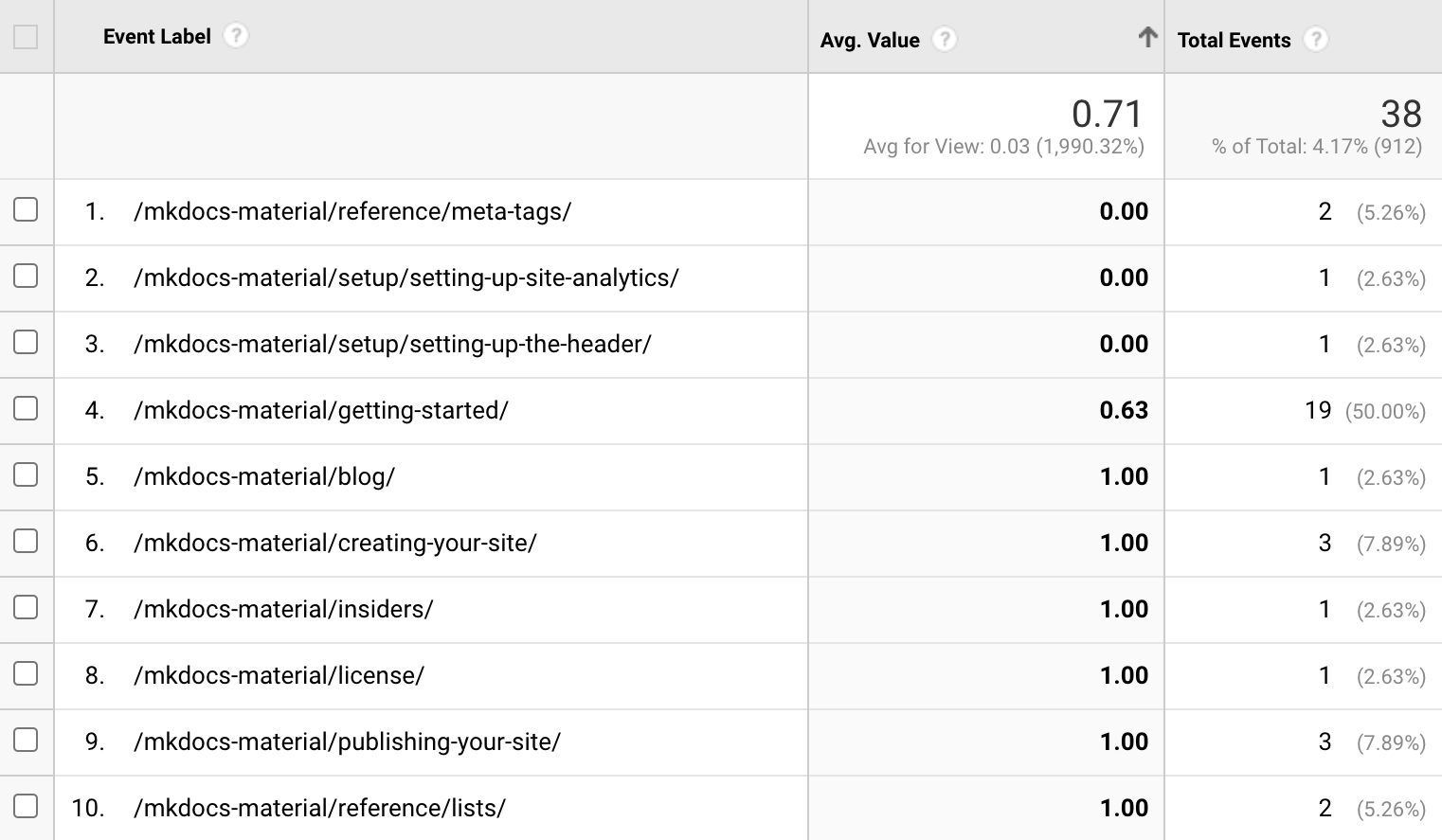
现在,保存报告并收集一些反馈评分后,您将获得所有页面的列表,其中包含评分总数和每个页面的平均评分。这应该可以帮助您识别需要改进的页面:
¥Go to your Google Analytics dashboard
Google Analytics 4 不支持平均值
¥Go to the Admin page on the left hand menu (at the bottom), then select custom definitions on the Data display card
据我们所知,Google Analytics 4 目前尚不支持自定义计算指标来计算页面平均评分。请参阅#5740 。
¥Click the custom metrics tab and then create custom metrics, enter the following values:
每个评级均具有以下属性:
¥Configure the report as follows:
icon-
此属性必须指向有效的图标路径,该路径引用与主题捆绑的任何图标,否则构建将无法成功。一些常见的组合:
¥Delay in data availability
+ –
material/emoticon-happy-outline+material/emoticon-sad-outline¥Event parameter:
data+ –
material/thumb-up-outline+material/thumb-down-outline¥Unit of measurement: Standard
+ –
material/heart+material/heart-broken
name-
此属性的值在用户交互(即键盘焦点或鼠标悬停)时显示,解释图标背后评级的含义。
¥The report may take 24 hours or longer to begin displaying data
data-
此属性的值作为数据值随自定义事件一起发送,并传输到 Google Analytics 3 (或任何自定义集成)。
¥Now, after you've saved the report and collected some feedback ratings, you'll have a list of all pages with the total number of ratings, and an average rating per page. This should help you identify pages that need to be improved:
note-
此属性的值在用户选择评分后显示。它可以包含任意 HTML 标签,这对于要求用户通过表单提供当前页面的更详细反馈尤其有用。您还可以使用以下占位符在表单中预填充当前页面的 URL 和标题:
¥Google Analytics 4 does not support average values
{url}– 页面 URL{title}– 页面标题¥Dimensions: Add
Event name
在此示例中,单击链接时,用户将被重定向到存储库的“新问题”表单,其中包含预填充的标题,包括当前文档的路径,例如:
¥To our knowledge, Google Analytics 4 has currently no feature that allows to define a custom calculated metric to compute the average rating of a page. See #5740.
GitHub 问题的替代方案是Google Forms 。
用法
¥Usage
隐藏反馈小部件
¥Hiding the feedback widget
可以使用 front matter hide属性隐藏文档的反馈小部件。在 Markdown 文件的顶部添加以下几行:
¥The following properties are available for each rating:
定制
¥Customization
自定义站点分析
¥Custom site analytics
为了集成其他提供基于 JavaScript 的跟踪解决方案的分析服务提供商,只需按照主题扩展指南,在overrides文件夹中创建一个新的部分代码。该部分代码的名称用于通过mkdocs.yml配置自定义集成:
¥ This property must point to a valid icon path referencing any icon bundled with the theme, or the build will not succeed. Some popular combinations:
<script>
  /* Add custom analytics integration here, e.g. */
  var property = "{{ config.extra.analytics.property }}" // (1)!

  /* Wait for page to load and application to mount */
  document.addEventListener("DOMContentLoaded", function() {
    location$.subscribe(function(url) {
      /* Add custom page event tracking here */ // (2)!
    })
  })
</script>
例如,此变量接收
mkdocs.yml中设置的值,即property的"foobar"。¥Metrics: Add
Event countandPage helpful(the custom metric created in step 3)如果您使用即时加载,则可以使用
location$observable 来监听导航事件,该事件始终会发出当前URL。¥Rows:
Page location
自定义站点反馈
¥Custom site feedback
自定义反馈小部件集成只需要借助一些额外的 JavaScript来处理用户与反馈小部件交互所产生的事件:
¥ The value of this property is shown on user interaction (i.e. keyboard focus or mouse hover), explaining the meaning of the rating behind the icon.
document$.subscribe(function() {
  var feedback = document.forms.feedback
  if (typeof feedback === "undefined") return

  feedback.hidden = false // (1)!

  feedback.addEventListener("submit", function(ev) {
    ev.preventDefault()

    var page = document.location.pathname // (2)!
    var data = ev.submitter.getAttribute("data-md-value")

    console.log(page, data) // (3)!

    feedback.firstElementChild.disabled = true // (4)!

    var note = feedback.querySelector(
      ".md-feedback__note [data-md-value='" + data + "']"
    )
    if (note)
      note.hidden = false // (5)!
  })
}
反馈小部件默认是隐藏的,即使用户关闭 JavaScript 也不会显示。因此,需要在此处将其打开。
¥Filters: Add a new filter for
检索页面和反馈值。
¥
将其替换为将数据发送给分析提供商的代码。
¥
提交后禁用表单。
¥
显示已配置的注释。显示哪一个取决于用户反馈。
¥
{url}
在 Material for MkDocs 9.2.0 之前,Universal Analytics 也受支持。然而,由于 Universal Analytics 已停用,此集成已在 9.2.0 中被移除。↩
¥
{title}– Page title如果用户不接受
analyticscookie,则不会显示反馈小部件。↩¥As an example, this variable receives the value set in
mkdocs.yml, which is"foobar"请注意,对于 Google Analytics,数据值必须是整数。↩
¥If you're using instant loading