确保数据隐私
¥Ensuring data privacy
Material for MkDocs 让遵守数据隐私法规变得非常容易,因为它提供了原生的Cookie 同意解决方案,可以在设置分析之前征求用户的明确同意。此外,还可以自动下载外部资产以实现自托管。
¥Material for MkDocs makes compliance with data privacy regulations very easy, as it offers a native cookie consent solution to seek explicit consent from users before setting up analytics. Additionally, external assets can be automatically downloaded for self-hosting.
配置
¥Configuration
Cookie 同意
¥Cookie consent
8.4.0 。拉链
Material for MkDocs 附带一个原生且可扩展的 Cookie 同意表单,该表单会在向第三方发送请求之前征求用户的同意。将以下内容添加到mkdocs.yml中:
¥Material for MkDocs ships a native and extensible cookie consent form which asks the user for consent prior to sending requests to third parties. Add the following to mkdocs.yml:
extra:
  consent:
    title: Cookie consent
    description: >- # (1)!
      We use cookies to recognize your repeated visits and preferences, as well
      as to measure the effectiveness of our documentation and whether users
      find what they're searching for. With your consent, you're helping us to
      make our documentation better.
您可以在
description中添加任意 HTML 标签,例如链接到您的服务条款或网站的其他部分。¥You can add arbitrary HTML tags in the
description, e.g. to link to your terms of service or other parts of the site.
可用的属性如下:
¥The following properties are available:
title-
此属性设置cookie同意的标题,该标题呈现在表单的顶部,并且必须设置为非空字符串。
¥ This property sets the title of the cookie consent, which is rendered at the top of the form and must be set to a non-empty string.
description-
此属性设置 cookie 同意的描述,呈现在标题下方,并且可能包含原始 HTML(例如服务条款的链接)。
¥ This property sets the description of the cookie consent, is rendered below the title, and may include raw HTML (e.g. a links to the terms of service).
cookies-
此属性允许添加自定义 Cookie 或更改内置 Cookie 的初始
checked状态和名称。目前,内置 Cookie 如下:¥ This property allows to add custom cookies or change the initial
checkedstate and name of built-in cookies. Currently, the following cookies are built-in:Google Analytics –
analytics(默认启用)¥Google Analytics –
analytics(enabled by default)GitHub –
github(默认启用)¥GitHub –
github(enabled by default)
每个 cookie 必须接收一个唯一标识符,该标识符用作
cookies映射中的键,可以设置为字符串,也可以设置为定义name和checked状态的映射:¥Each cookie must receive a unique identifier which is used as a key in the
cookiesmap, and can be either set to a string, or to a map definingnameandcheckedstate:如果通过
mkdocs.yml配置了 Google Analytics,则 Cookie 同意将自动包含一个供用户禁用的设置。可以通过 JavaScript 使用自定义 Cookie 。¥If Google Analytics was configured via
mkdocs.yml, the cookie consent will automatically include a setting for the user to disable it. Custom cookies can be used from JavaScript. actions-
[接受,管理]此属性定义显示哪些按钮以及按什么顺序显示,例如允许用户接受 cookie 和管理设置:
¥
[accept, manage]This property defines which buttons are shown and in which order, e.g. to allow the user to accept cookies and manage settings:如果在
actions属性中省略了manage设置按钮,则始终显示设置。¥If the
managesettings button is omitted from theactionsproperty, the settings are always shown.
Cookie 同意表单包含三种类型的按钮:
¥The cookie consent form includes three types of buttons:
accept– 接受所选 cookie 的按钮¥
accept– Button to accept selected cookiesreject– 拒绝所有 cookie 的按钮¥
reject– Button to reject all cookiesmanage– 管理设置的按钮¥
manage– Button to manage settings
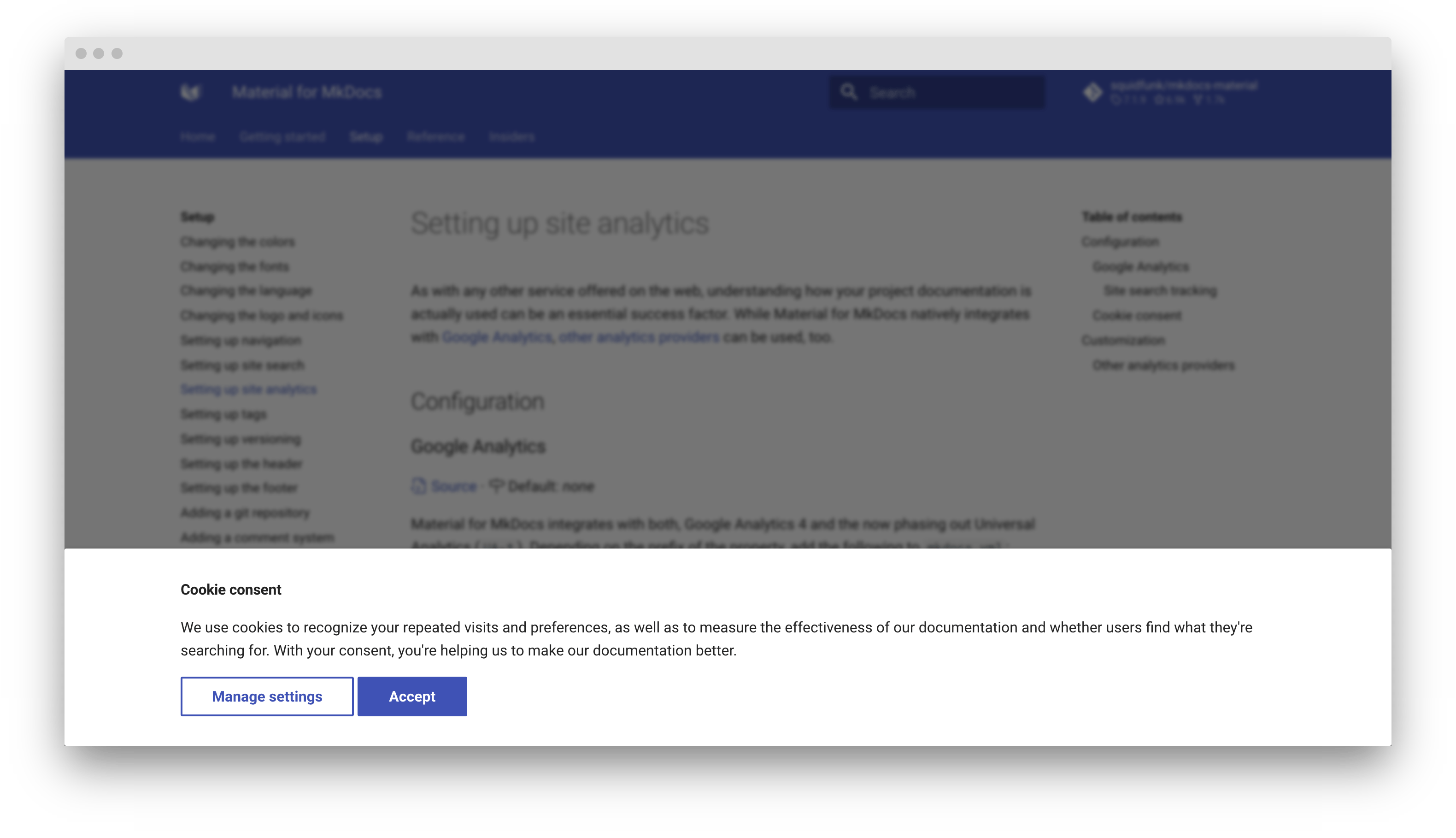
当用户首次访问您的网站时,会呈现一个 Cookie 同意表单:
¥When a user first visits your site, a cookie consent form is rendered:
更改 Cookie 设置
¥Change cookie settings
为了符合 GDPR 的规定,用户必须能够随时更改其 Cookie 设置。您可以通过在mkdocs.yml中添加一个简单的版权声明链接来实现:
¥In order to comply with GDPR, users must be able to change their cookie settings at any time. This can be done by adding a simple link to your copyright notice in mkdocs.yml:
copyright: >
  Copyright © 2016 - 2024 Martin Donath –
  <a href="#__consent">Change cookie settings</a>
内置隐私插件
¥Built-in privacy plugin
9.5.0隐私
内置的隐私插件会在构建过程中自动识别外部资源,并下载所有资源,从而实现非常简单的自托管。将以下几行添加到mkdocs.yml中:
¥The built-in privacy plugin automatically identifies external assets as part of the build process and downloads all assets for very simple self-hosting. Add the following lines to mkdocs.yml:
有关所有设置的列表,请参阅插件文档。
¥For a list of all settings, please consult the plugin documentation.
外部托管图像并自动优化
¥Hosting images externally and optimizing them automatically
当您想要将图像等资产托管在 git 存储库之外的另一个位置以保持它们新鲜并使存储库精简时,此选项使内置隐私插件成为绝佳选择。
¥This option makes the built-in privacy plugin an excellent choice for when you want to host assets like images outside of your git repository in another location to keep them fresh and your repository lean.
此外,从insiders-4.30.0 版本开始,内置的隐私插件已完全重写,现在可以与内置的优化插件完美配合,这意味着外部资源可以与其他文档一样通过相同的优化流程。这意味着您可以在代码库之外存储和编辑未优化的文件,并让这两个插件为您构建一个高度优化的网站。
¥Additionally, as of insiders-4.30.0, the built-in privacy plugin was entirely rewritten and now works perfectly with the built-in optimize plugin, which means that external assets can be passed through the same optimization pipeline as the rest of your documentation. This means you can store and edit unoptimized files outside of your repository, and let both plugins built a highly optimized site for you.
如果您想要实现单独的管道,即对某些图像进行与其他图像不同的优化或从下载中排除某些图像,则可以使用内置隐私插件的多个实例。
¥If you want to implement separate pipelines, i.e., optimize some images differently from others or exclude some images from downloading, you can use multiple instances of the built-in privacy plugin.
为什么 Material for MkDocs 不能通过设计捆绑所有资产?
¥Why can't Material for MkDocs bundle all assets by design?
Material for MkDocs 无法直接打包所有自有资源的主要原因是与Google Fonts 的集成,后者提供了上千种不同的字体可用于渲染文档。大多数字体包含多种粗细,并被拆分成不同的字符集,以减少下载文件大小,从而使浏览器只下载真正需要的内容。对于我们的默认常规字体Roboto 来说,这总共需要 42 个 *.woff2 文件。
¥The primary reason why Material for MkDocs can't just bundle all of its own assets is the integration with Google Fonts, which offers over a thousand different fonts that can be used to render your documentation. Most of the fonts include several weights and are split up into different character sets to keep the download size small, so the browser only downloads what is really needed. For Roboto, our default regular font, this results in 42 *.woff2 files in total.
如果 Material for MkDocs 将所有字体文件打包在一起,下载大小将高达数百兆,从而降低自动构建速度。此外,作者可能会添加外部资产,例如第三方脚本或样式表,需要记住将这些资产定义为其他本地资产。
¥If Material for MkDocs would bundle all font files, the download size would be in the hundreds of megabytes, slowing down automated builds. Furthermore, authors might add external assets like third-party scripts or style sheets that would need to be remembered to be defined as further local assets.
这就是内置隐私插件存在的原因——它自动执行手动下载所有外部资产的过程,以确保符合 GDPR,但存在一些技术限制。
¥This is the very reason the built-in privacy plugin exists — it automates the process of downloading all external assets manually to ensure compliance with GDPR with some some technical limitations.
Expand to inspect example
对于官方文档,内置隐私插件下载以下资源:
¥For the official documentation, the built-in privacy plugin downloads the following resources:
.
└─ assets/external/
   ├─ unpkg.com/tablesort@5.3.0/dist/tablesort.min.js
   ├─ fonts.googleapis.com/css
   └─ fonts.gstatic.com/s/
      ├─ roboto/v29/
      │  ├─ KFOjCnqEu92Fr1Mu51TjASc-CsTKlA.woff2
      │  ├─ KFOjCnqEu92Fr1Mu51TjASc0CsTKlA.woff2
      │  ├─ KFOjCnqEu92Fr1Mu51TjASc1CsTKlA.woff2
      │  ├─ KFOjCnqEu92Fr1Mu51TjASc2CsTKlA.woff2
      │  ├─ KFOjCnqEu92Fr1Mu51TjASc3CsTKlA.woff2
      │  ├─ KFOjCnqEu92Fr1Mu51TjASc5CsTKlA.woff2
      │  ├─ KFOjCnqEu92Fr1Mu51TjASc6CsQ.woff2
      │  ├─ KFOjCnqEu92Fr1Mu51TzBic-CsTKlA.woff2
      │  ├─ KFOjCnqEu92Fr1Mu51TzBic0CsTKlA.woff2
      │  ├─ KFOjCnqEu92Fr1Mu51TzBic1CsTKlA.woff2
      │  ├─ KFOjCnqEu92Fr1Mu51TzBic2CsTKlA.woff2
      │  ├─ KFOjCnqEu92Fr1Mu51TzBic3CsTKlA.woff2
      │  ├─ KFOjCnqEu92Fr1Mu51TzBic5CsTKlA.woff2
      │  ├─ KFOjCnqEu92Fr1Mu51TzBic6CsQ.woff2
      │  ├─ KFOkCnqEu92Fr1Mu51xEIzIFKw.woff2
      │  ├─ KFOkCnqEu92Fr1Mu51xFIzIFKw.woff2
      │  ├─ KFOkCnqEu92Fr1Mu51xGIzIFKw.woff2
      │  ├─ KFOkCnqEu92Fr1Mu51xHIzIFKw.woff2
      │  ├─ KFOkCnqEu92Fr1Mu51xIIzI.woff2
      │  ├─ KFOkCnqEu92Fr1Mu51xLIzIFKw.woff2
      │  ├─ KFOkCnqEu92Fr1Mu51xMIzIFKw.woff2
      │  ├─ KFOlCnqEu92Fr1MmSU5fABc4EsA.woff2
      │  ├─ KFOlCnqEu92Fr1MmSU5fBBc4.woff2
      │  ├─ KFOlCnqEu92Fr1MmSU5fBxc4EsA.woff2
      │  ├─ KFOlCnqEu92Fr1MmSU5fCBc4EsA.woff2
      │  ├─ KFOlCnqEu92Fr1MmSU5fCRc4EsA.woff2
      │  ├─ KFOlCnqEu92Fr1MmSU5fChc4EsA.woff2
      │  ├─ KFOlCnqEu92Fr1MmSU5fCxc4EsA.woff2
      │  ├─ KFOlCnqEu92Fr1MmWUlfABc4EsA.woff2
      │  ├─ KFOlCnqEu92Fr1MmWUlfBBc4.woff2
      │  ├─ KFOlCnqEu92Fr1MmWUlfBxc4EsA.woff2
      │  ├─ KFOlCnqEu92Fr1MmWUlfCBc4EsA.woff2
      │  ├─ KFOlCnqEu92Fr1MmWUlfCRc4EsA.woff2
      │  ├─ KFOlCnqEu92Fr1MmWUlfChc4EsA.woff2
      │  ├─ KFOlCnqEu92Fr1MmWUlfCxc4EsA.woff2
      │  ├─ KFOmCnqEu92Fr1Mu4WxKOzY.woff2
      │  ├─ KFOmCnqEu92Fr1Mu4mxK.woff2
      │  ├─ KFOmCnqEu92Fr1Mu5mxKOzY.woff2
      │  ├─ KFOmCnqEu92Fr1Mu72xKOzY.woff2
      │  ├─ KFOmCnqEu92Fr1Mu7GxKOzY.woff2
      │  ├─ KFOmCnqEu92Fr1Mu7WxKOzY.woff2
      │  └─ KFOmCnqEu92Fr1Mu7mxKOzY.woff2
      └─ robotomono/v13/
         ├─ L0xTDF4xlVMF-BfR8bXMIhJHg45mwgGEFl0_3vrtSM1J-gEPT5Ese6hmHSV0mf0h.woff2
         ├─ L0xTDF4xlVMF-BfR8bXMIhJHg45mwgGEFl0_3vrtSM1J-gEPT5Ese6hmHSZ0mf0h.woff2
         ├─ L0xTDF4xlVMF-BfR8bXMIhJHg45mwgGEFl0_3vrtSM1J-gEPT5Ese6hmHSd0mf0h.woff2
         ├─ L0xTDF4xlVMF-BfR8bXMIhJHg45mwgGEFl0_3vrtSM1J-gEPT5Ese6hmHSh0mQ.woff2
         ├─ L0xTDF4xlVMF-BfR8bXMIhJHg45mwgGEFl0_3vrtSM1J-gEPT5Ese6hmHSt0mf0h.woff2
         ├─ L0xTDF4xlVMF-BfR8bXMIhJHg45mwgGEFl0_3vrtSM1J-gEPT5Ese6hmHSx0mf0h.woff2
         ├─ L0xdDF4xlVMF-BfR8bXMIjhOsXG-q2oeuFoqFrlnAIe2Imhk1T8rbociImtElOUlYIw.woff2
         ├─ L0xdDF4xlVMF-BfR8bXMIjhOsXG-q2oeuFoqFrlnAIe2Imhk1T8rbociImtEleUlYIw.woff2
         ├─ L0xdDF4xlVMF-BfR8bXMIjhOsXG-q2oeuFoqFrlnAIe2Imhk1T8rbociImtEluUlYIw.woff2
         ├─ L0xdDF4xlVMF-BfR8bXMIjhOsXG-q2oeuFoqFrlnAIe2Imhk1T8rbociImtEm-Ul.woff2
         ├─ L0xdDF4xlVMF-BfR8bXMIjhOsXG-q2oeuFoqFrlnAIe2Imhk1T8rbociImtEmOUlYIw.woff2
         └─ L0xdDF4xlVMF-BfR8bXMIjhOsXG-q2oeuFoqFrlnAIe2Imhk1T8rbociImtEn-UlYIw.woff2
高级设置
¥Advanced settings
内部人员-4.50.0
以下高级设置目前仅供我们的赞助商使用。这些设置完全是可选的,不会影响博客的功能,但有助于进行自定义:
¥The following advanced settings are currently reserved to our sponsors. They are entirely optional, and don't affect the functionality of the blog, but can be helpful for customizations:
当我们发现新的用例时,我们会在这里添加更多设置。
¥We'll add more settings here, as we discover new use cases.
定制
¥Customization
自定义 Cookie
¥Custom cookies
8.4.0 .zip
如果您自定义了Cookie 同意设置并添加了custom Cookie,系统将提示用户接受或拒绝您的自定义 Cookie。一旦用户接受或拒绝 Cookie 同意设置,或者更改设置,页面将重新加载1 。使用其他 JavaScript查询结果:
¥If you've customized the cookie consent and added a custom cookie, the user will be prompted to accept or reject your custom cookie. Once the user accepts or rejects the cookie consent, or changes the settings, the page reloads1. Use additional JavaScript to query the result:
我们刷新页面是为了简化与自定义 Cookie 的互操作。如果 Material for MkDocs 实现了基于回调的方法,作者需要确保正确更新所有使用 Cookie 的脚本。此外,Cookie 同意仅在初始阶段得到响应,因此我们认为这是 DX 和 UX 之间的良好平衡。↩